Friday, 11 March 2016

Debugging Complex Macros

It’s possible to write code generated by macros to an external file. The file can’t be access until the SAS session has ended. In SAS 6.12 you use the options RESERVEDB1 & MPRINT to achieve this. In version 8 you need to use the options MFILE & MPRINT. 

You then also need to define a fileref for MPRINT, to which the generated SAS code is written. 

filename mprint 'c:\macro.sas' ; 

This technique is very useful for complex macros with many loops and multiple ampersands since you can see the code that is generated. You can then run the code generated through data step debugger to resolve any problems or understand what is happening.

Read More »

Wednesday, 2 March 2016

Few interesting new features in SAS 9.3 – Macro Language

Automatic Macro Variable SYSNOBS: Contains the number of observations read from the last data set that was closed by the previous procedure or DATA step.
Macro Function %SYSMACEXIST: Indicates whether there is a macro definition exist in the WORK.SASMACR catalog.
Macro Statement %SYSMACDELETE: Deletes a macro definition from the WORK.SASMACR catalog.
Till SAS 9.2, the alternate code what we used to write is:
proc catalog catalog=work.sasmacr;
delete helloworld.macro;
quit;
More macro debugging with MAUTOCOMPLOC System option: Displays in the SAS log the source location of the autocall macros when the autocall macro is compiled.
Read More »

Wednesday, 13 January 2016

What is the difference between '+' operator and SUM function?


 SUM function returns the sum of non-missing arguments whereas “+” operator returns a missing value if any of the arguments are missing.

Suppose we have a data set containing three variables - X, Y and Z. They all have missing values. We wish to compute sum of all the variables.

The data is shown in the image below :


data mydata2;
set mydata;
a=sum(x,y,z);
p=x+y+z;
run;

The output is shown in the image below :


In the output, value of p is missing for 4th, 5th and 6th observations.
Read More »

Difference between WHERE and IF conditions


WHERE condition wins against IF condition in the following cases :

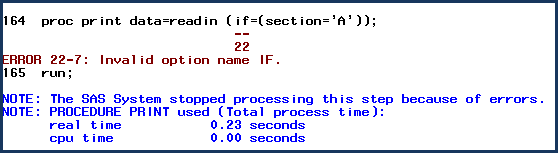
1. The WHERE statement can be used in procedures to subset data while IF statement cannot be used in procedures.

Look at the log of WHERE and IF statements shown below :


2. WHERE can be used as a data set option while IF cannot be used as a data set option.

Look at the log of WHERE and IF conditions shown below :


3. The WHERE statement is more efficient than IF statement. It tells SAS not to read all observations from the data set.

Look at the LOG (shown below) after using WHERE statement, you only see a count of the number of observations that meet the criteria in the WHERE statement.

Only 6 observations were read from the dataset READIN. In actual, the dataset READIN contains 14 observations.


All 14 observations are read and the 6 that meet the IF criteria are placed in the new data set.


NOTE : Both statements produced the same result.

4. The WHERE statement can be used to search for all similar character values that sound alike while IF statement cannot be used.

For example, you want to filter out all the names that sound alike 'Sam'.


IF condition wins against WHERE condition in the following cases :

1. When reading data using INPUT statement.

IF Statement


WHERE Statement

WHERE statement can not be used when specifying an input statement.


2. When it is required to execute multiple conditional statements

Suppose, you have data for college students’ mathematics scores. You want to rate them on the basis of their scores.

Conditions :
1. If a score is less than 40, create a new variable named “Rating” and give “Poor” rating to these students.
2. If a score is greater than or equal to 40 but less than 75, give “Average” rating to these students.
3. If a score is greater than or equal to 75 but less than or equal to 100, give “Excellent” rating to these students.

This can be easily done using IF-THEN-ELSE IF statements. However, WHERE statement requires variables to exist in the data set.


3. When it is required to use newly created variables.

IF statement doesn't require variables to exist in the READIN data set while WHERE statement requires variable to exist in the data set.


SOURCE
Read More »

Thursday, 31 December 2015

Specifying the most recently created data set to use in a read operation

By default, the _LAST_= system option is set to use the most recently created data set. This automatic feature is commonly found in procedure code when the DATA= option is omitted from a PROC.

 To override this built-in default, the _LAST_= system option can be defined as any valid temporary or permanent SAS data set name (refer to data set naming conventions).

The _LAST_= option can be specified in an OPTIONS statement, in the OPTIONS window, at SAS invocation, or in the configuration file.  
Read More »

Wednesday, 30 December 2015

Writing SAS source files included with a %INCLUDE statement to the SAS Log

By default, SAS source statements included with a %INCLUDE statement are NOT automatically written to the SAS Log. To print secondary SAS source statements included with a %INCLUDE statements, users will need to specify the SOURCE2 system option. 


The default setting is NOSOURCE2. Either option can be specified in an OPTIONS statement, in the OPTIONS window, at SAS invocation, or in the configuration file.  

Read More »

Preventing SAS data sets from accidentally being replaced

Users can specify the NOREPLACE system option to prevent a permanent SAS data set from being accidentally replaced with another like-named data set. Conversely, by specifying the REPLACE system option like-named data sets can be overwritten.

The REPLACE | NOREPLACE option can be specified in an OPTIONS statement, in the OPTIONS window, at SAS invocation, or in the configuration file.  
Read More »